ROOM64 / KNOWLEDGE / ERPNEXT

BOM Explorer

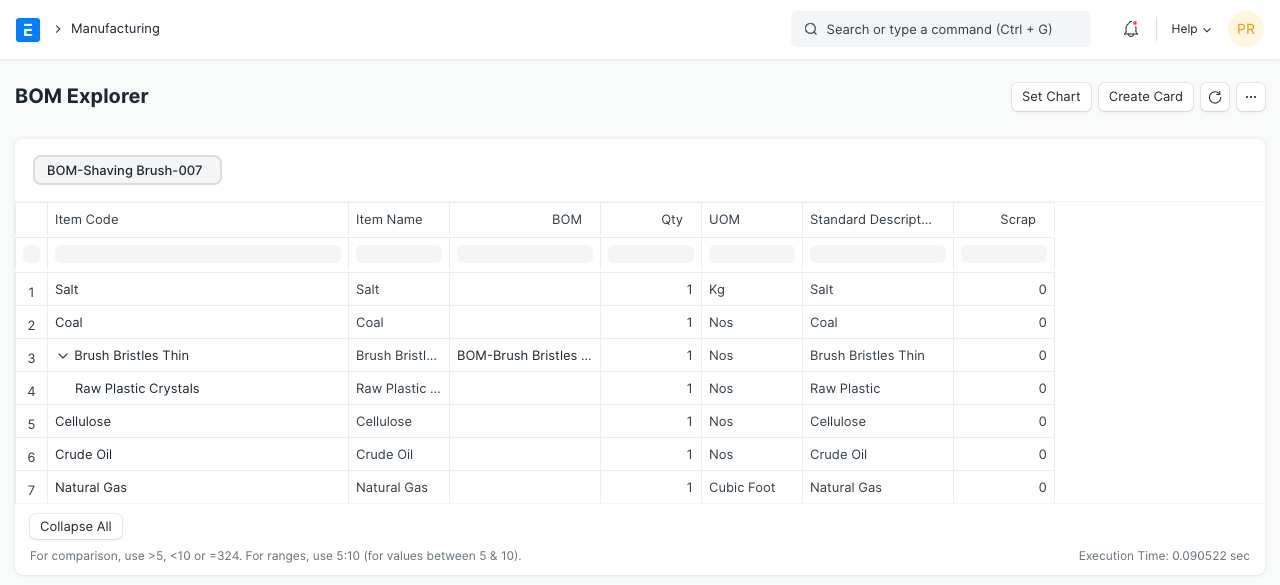
BOM Explorer Report shows a complete hierarchy of the Bill of Materials (BOM) with its raw materials in the form of the tree view.

อ่านต้นฉบับที่ ERPNext Official Docs ↗
เอกสารอ้างอิงภาษาอังกฤษเนื้อหาจากเอกสาร ERPNext คงรายละเอียดและโค้ดตามต้นฉบับ · ต้นฉบับอัปเดต 2026-02-26 ชื่อเมนูและ DocType ที่ใช้ได้ขึ้นอยู่กับเวอร์ชันและรุ่นที่ทีมใช้งาน

Manufacturing · งานผลิต · BOM Explorer

BOM Explorer Report shows a complete hierarchy of the Bill of Materials (BOM) with its raw materials in the form of the tree view.

You need to select the BOM in the filter then the report will show the quantity of required raw materials and scraps for manufacturing the item. It is the complete tree view of assemblies, sub-assemblies i.e. all exploded items.

Using the BOM Explorer, user can view the quantity of raw materials and scraps from all exploded items and print it.

reorder level

เนื้อหาเอกสารอ้างอิงและภาพประกอบมาจาก ERPNext / Frappe Official Docs · บทความแนะนำภาษาไทยเรียบเรียงโดย Room64 · เว็บไซต์นี้เป็นคู่มือประกอบการใช้งานโดย Room64 · เอกสารทางการ ↗

มีงานที่อยากให้ Software, AI หรือ Automation ช่วยอยู่ไหม?

เล่า workflow หรือปัญหาที่ทีมกำลังเจอ เราช่วยดูได้ว่าควรใช้ระบบสำเร็จรูป เชื่อมเครื่องมือเดิม หรือพัฒนาเพิ่มเฉพาะส่วนไหน

คุยกับเราทาง LINEhello@room64.net