
Nova Electronics Trading approved a $120,000 marketing Budget, distributed as $10,000 per month. By the end of March, the team has spent $27,500. The finance manager needs one answer: is marketing spending ahead of plan, behind plan, or exactly where it should be?
The Budget Variance Report puts the approved Budget and actual expenses beside each other. Nova can see the planned amount, the amount posted through accounting transactions, and the difference for each period. A positive or negative variance is useful only after you confirm how your organisation interprets the report's sign, so focus first on whether actual spending is above or below the budget.
Before you begin
Create and submit a Budget against the required Cost Center , Project , or Accounting Dimension . Actual values come from submitted transactions that post to the same Account , company, period, and reporting segment.
Review budget performance
Open Budget Variance Report from Accounting. Select the Company, Fiscal Year, Budget Against, and reporting frequency. Use Monthly for operational reviews and Quarterly or Yearly for a higher-level view.
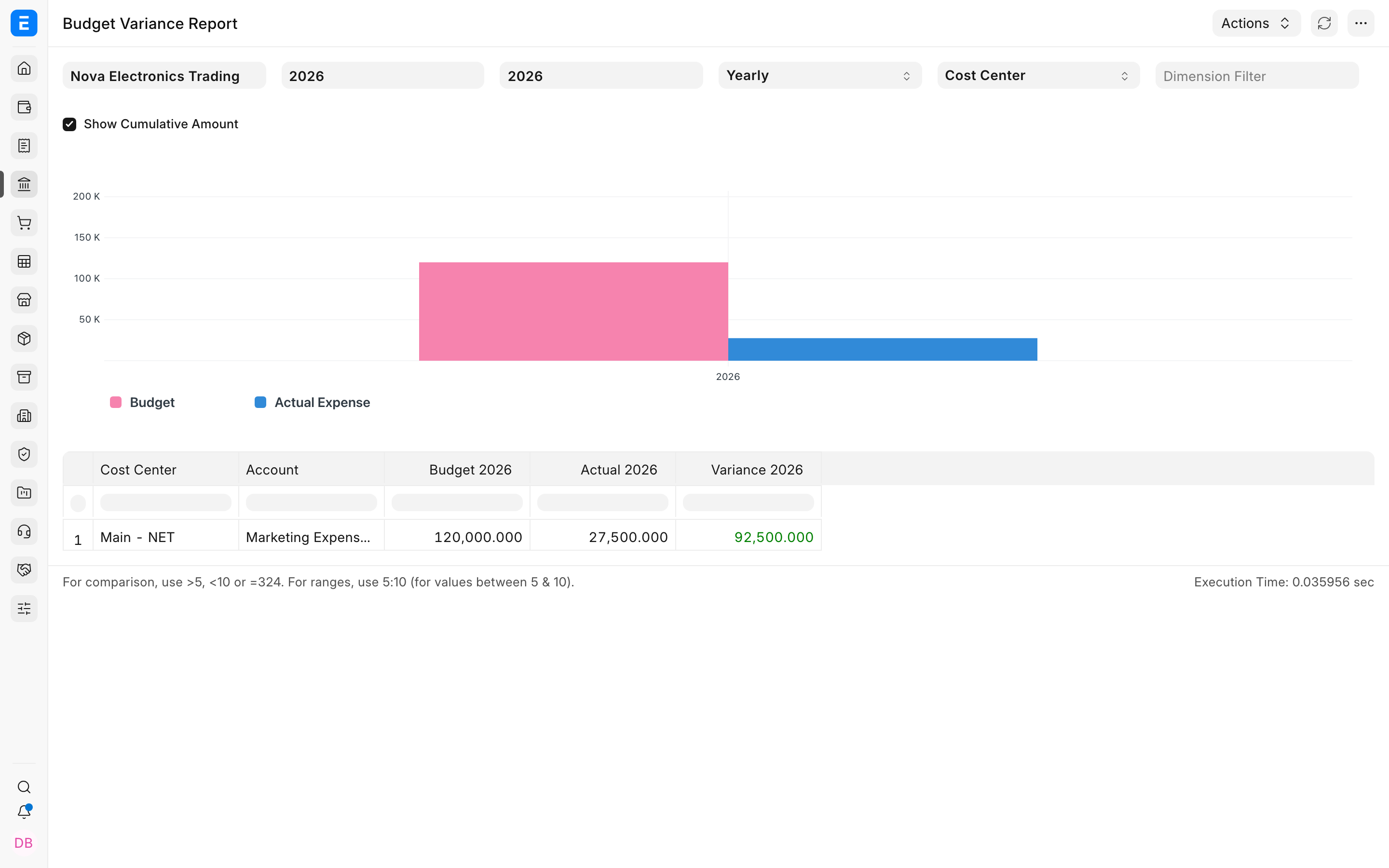
Select Show Cumulative when you want to compare total budget and total actual spending up to each period. This is useful when spending is seasonal and one month should not be judged in isolation.
Read the result
| Column | Meaning |
|---|---|
| Budget | The amount approved for the period by the applicable Budget. |
| Actual | Submitted expense entries posted to the matching account and reporting segment. |
| Variance | The difference between the planned and actual amount. |
| Cumulative values | The running budget, actual amount, and variance through that period. |
If actual spending looks incomplete, check the General Ledger for the same account, dates, and Cost Center. A Journal Entry , Purchase Invoice , or other submitted expense transaction contributes only when its dimensions match the Budget.
Troubleshooting
The report is empty
Confirm that a submitted Budget exists for the selected Company, Fiscal Year, account, and reporting segment. This report is budget-driven, so actual expenses alone do not create rows.
The actual amount is lower than expected
Check whether the missing transactions use another Cost Center, Project, Account, Posting Date, or accounting dimension. Compare the report with the General Ledger using identical filters.
Frequently asked questions
Does the report enforce the budget?
Budget controls enforce or warn about limits. The report explains performance after transactions have been requested, committed, or posted.
Should I use monthly or cumulative values?
Monthly values show what happened in one period. Cumulative values show whether the organisation is within its plan overall despite timing differences.
