
ROOM64 / KNOWLEDGE / ERPNEXT

Periodic Inventory

If you enable Perpetual Inventory in the Company master, the system will automatically create the GL entries for stock transactions. However, if Perpetual Inventory is disabled for

อ่านต้นฉบับที่ ERPNext Official Docs ↗
เอกสารอ้างอิงภาษาอังกฤษเนื้อหาจากเอกสาร ERPNext คงรายละเอียดและโค้ดตามต้นฉบับ · ต้นฉบับอัปเดต 2026-02-20 ชื่อเมนูและ DocType ที่ใช้ได้ขึ้นอยู่กับเวอร์ชันและรุ่นที่ทีมใช้งาน

Stock · สต็อกและคลังสินค้า · Periodic Inventory

If you enable Perpetual Inventory in the Company master, the system will automatically create the GL entries for stock transactions. However, if Perpetual Inventory is disabled for your company, you will need to manually create periodic accounting entries.

To make a periodic accounting entry, you must create a Journal Entry manually. For the calculations, you need to compare the closing balance in the Stock Balance Report with the Trial Balance report for stock asset accounts. This process takes time, as it requires verifying and matching the differences in closing balances.

To address this in Version 16, we introduced a new Journal Entry type called 'Periodic Accounting Entry'. With this, users don’t need to perform manual calculations. The system will automatically fetch the difference in balance when the user clicks the 'Get Balance' button.
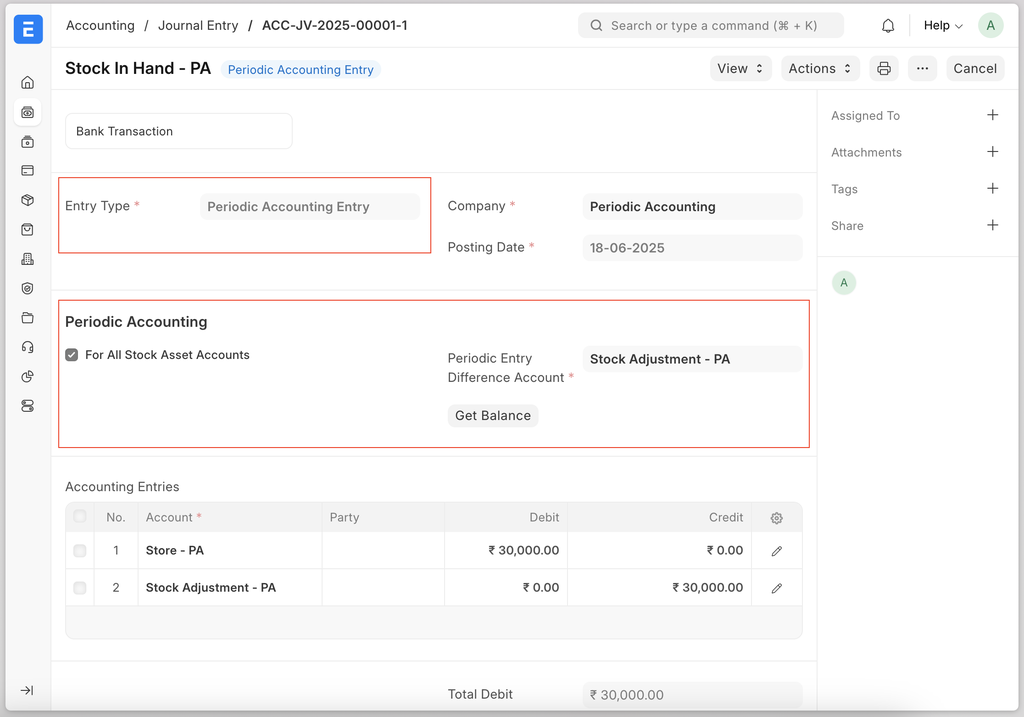

ภาพประกอบ Periodic Inventory จาก ERPNext

เนื้อหาเอกสารอ้างอิงและภาพประกอบมาจาก ERPNext / Frappe Official Docs · บทความแนะนำภาษาไทยเรียบเรียงโดย Room64 · เว็บไซต์นี้เป็นคู่มือประกอบการใช้งานโดย Room64 · เอกสารทางการ ↗

มีงานที่อยากให้ Software, AI หรือ Automation ช่วยอยู่ไหม?

เล่า workflow หรือปัญหาที่ทีมกำลังเจอ เราช่วยดูได้ว่าควรใช้ระบบสำเร็จรูป เชื่อมเครื่องมือเดิม หรือพัฒนาเพิ่มเฉพาะส่วนไหน

คุยกับเราทาง LINEhello@room64.net