
A Quality Action is taken on a Quality Review to correct unsatisfactory results or prevent them from happening.
Quality Action is a standard feature to allow implementation of corrective and preventive actions. This will meet compliance with industry regulations including GMP, ISO 9001 and 14001, TSCA, REACH, etc.
Quality Action workflows provide a controlled environment and reduce the risk of repeat issues by ensuring that defined solutions and processes are met.
Quality Actions can be initialized for a Quality Goal or for a Customer Feedback which may not meet the expected quality standards. Depending on that a Corrective or Preventive Action can be started.
To access Quality Action, go to:
Home > Quality > Review and Action > Quality Action
1. Prerequisites
Before creating and using a Quality Action it is advised to create the following first:
2. How to create a Quality Action
- Go to the Quality Action list, click on New.
- Select whether it's a Corrective or Preventive action. This indicates whether the action is being scheduled for Corrective or for Preventive Purpose.
- Select the Document Type whether a Quality Review or a Quality Feedback.
- Select the actual Quality Review or Feedback under Document Name.
- Enter a Resolution proposed for the problem in the Resolution field.
- Save.
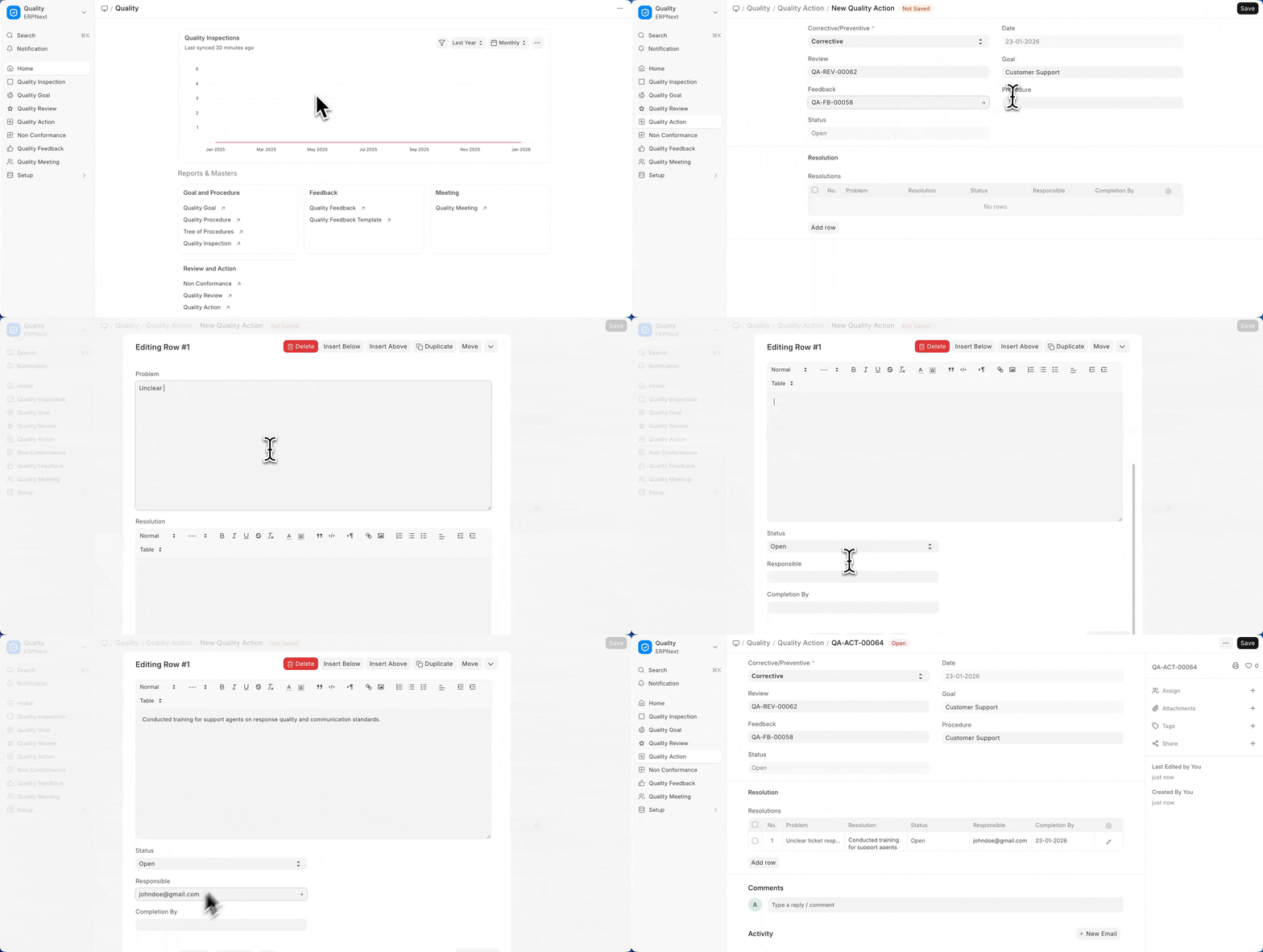
The Status field indicates whether the Quality Action is Open and ongoing or Closed.
