
ROOM64 / KNOWLEDGE / ERPNEXT

Return Rejected Items

In the Purchase Receipt, you can receive the Items in the Accepted or the Rejected Warehouse.

อ่านต้นฉบับที่ ERPNext Official Docs ↗
เอกสารอ้างอิงภาษาอังกฤษเนื้อหาจากเอกสาร ERPNext คงรายละเอียดและโค้ดตามต้นฉบับ · ต้นฉบับอัปเดต 2026-03-02 ชื่อเมนูและ DocType ที่ใช้ได้ขึ้นอยู่กับเวอร์ชันและรุ่นที่ทีมใช้งาน

Stock · สต็อกและคลังสินค้า · Return Rejected Items

In the Purchase Receipt, you can receive the Items in the Accepted or the Rejected Warehouse.

If you are creating Purchase Return for the items received in the Rejected Warehouse, then create return entry following these steps.

  1. In the Purchase Receipt Item table, for the item to be returned, in the Received Qty field, enter return entry in negative.
  2. In the Accepted Warehouse field, set value as zero.
  3. In the Rejected Warehouse field, set the quantity to be returned in negative.

For detailed steps on how to create Purchase Return Entry for the Rejected Item, refer to the below example.
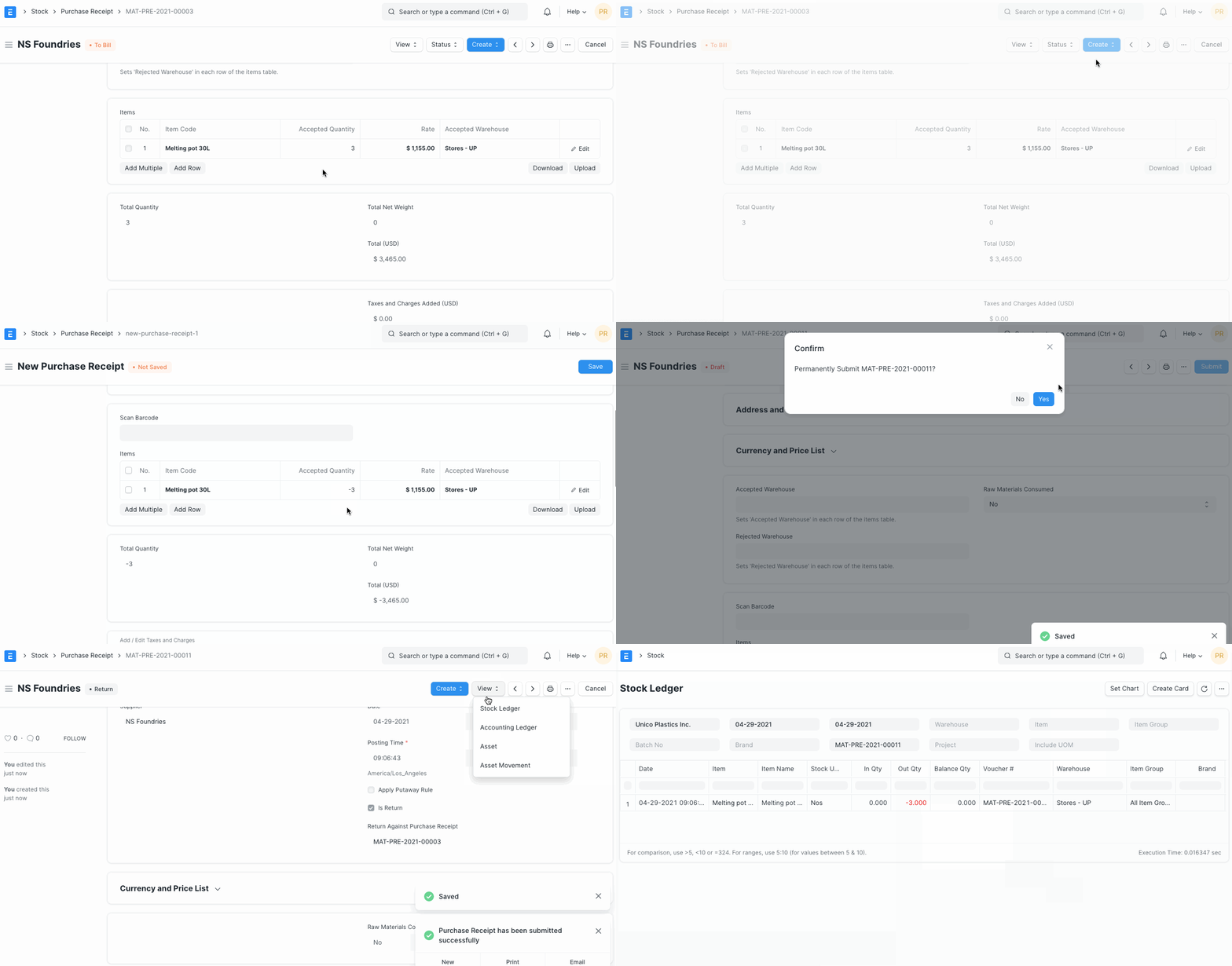

Returning Rejected Items

เนื้อหาเอกสารอ้างอิงและภาพประกอบมาจาก ERPNext / Frappe Official Docs · บทความแนะนำภาษาไทยเรียบเรียงโดย Room64 · เว็บไซต์นี้เป็นคู่มือประกอบการใช้งานโดย Room64 · เอกสารทางการ ↗

มีงานที่อยากให้ Software, AI หรือ Automation ช่วยอยู่ไหม?

เล่า workflow หรือปัญหาที่ทีมกำลังเจอ เราช่วยดูได้ว่าควรใช้ระบบสำเร็จรูป เชื่อมเครื่องมือเดิม หรือพัฒนาเพิ่มเฉพาะส่วนไหน

คุยกับเราทาง LINEhello@room64.net