
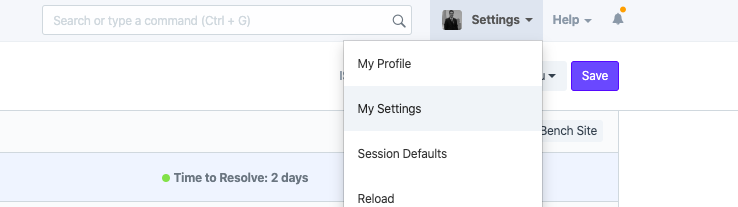
To add your signature, go to your User Profile under Settings > My Settings
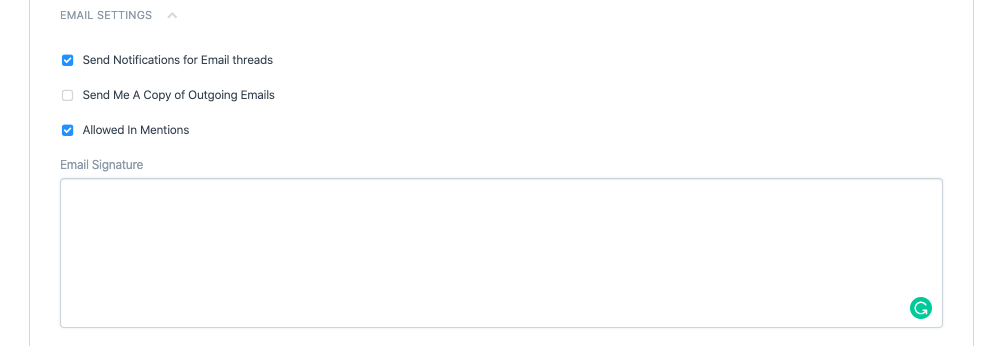
Scroll down to the Email Settings section where you can add your signature in HTML:
ROOM64 / KNOWLEDGE / ERPNEXT
To add your signature, go to your User Profile under Settings > My Settings
อ่านต้นฉบับที่ ERPNext Official Docs ↗Introduction · เริ่มต้นและตั้งค่า · Setting Up Email Signature in ERPNext
To add your signature, go to your User Profile under Settings > My Settings
Scroll down to the Email Settings section where you can add your signature in HTML:
+เริ่มจากบทสนทนา
เล่า workflow หรือปัญหาที่ทีมกำลังเจอ เราช่วยดูได้ว่าควรใช้ระบบสำเร็จรูป เชื่อมเครื่องมือเดิม หรือพัฒนาเพิ่มเฉพาะส่วนไหน
คุยกับเราทาง LINEhello@room64.netส่งอีเมลหาเรา