
ROOM64 / KNOWLEDGE / ERPNEXT

Work Order Summary

To access the Work Order Summary, go to:

อ่านต้นฉบับที่ ERPNext Official Docs ↗
เอกสารอ้างอิงภาษาอังกฤษเนื้อหาจากเอกสาร ERPNext คงรายละเอียดและโค้ดตามต้นฉบับ · ต้นฉบับอัปเดต 2026-02-26 ชื่อเมนูและ DocType ที่ใช้ได้ขึ้นอยู่กับเวอร์ชันและรุ่นที่ทีมใช้งาน

Manufacturing · งานผลิต · Work Order Summary

To access the Work Order Summary, go to:

Home > Manufacturing > Reports > Work Order Summary
Task

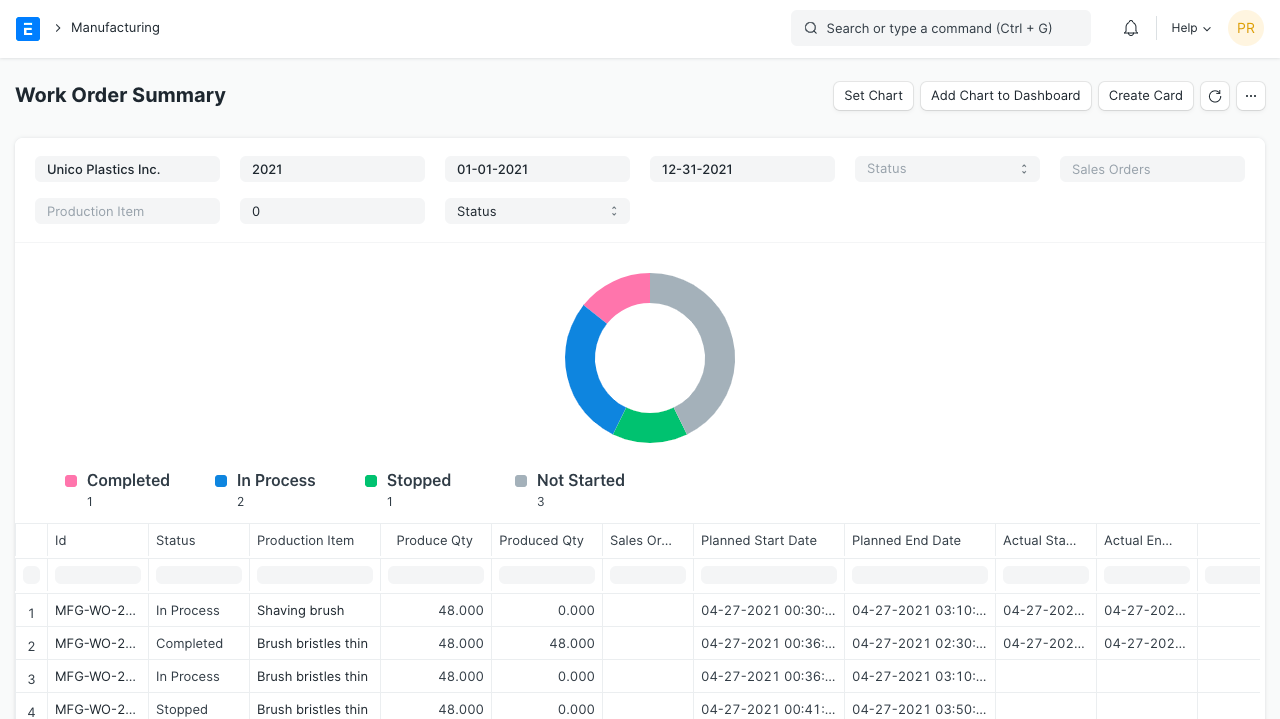
This report will give information about the Work Order. Using this report user will understand the number of produced quantity against each Work Order as well the status of the Work Order.

Using this report user can check the status of the Work Orders which are linked to the Sales Order. Also using this report users can check the Work Orders based on the status like Not Started, In Process, Completed, and Stopped.

เนื้อหาเอกสารอ้างอิงและภาพประกอบมาจาก ERPNext / Frappe Official Docs · บทความแนะนำภาษาไทยเรียบเรียงโดย Room64 · เว็บไซต์นี้เป็นคู่มือประกอบการใช้งานโดย Room64 · เอกสารทางการ ↗

มีงานที่อยากให้ Software, AI หรือ Automation ช่วยอยู่ไหม?

เล่า workflow หรือปัญหาที่ทีมกำลังเจอ เราช่วยดูได้ว่าควรใช้ระบบสำเร็จรูป เชื่อมเครื่องมือเดิม หรือพัฒนาเพิ่มเฉพาะส่วนไหน

คุยกับเราทาง LINEhello@room64.net