
เอกสารประกอบสำหรับ node แก้ไขฟิลด์ใน n8n ซึ่งเป็นแพลตฟอร์มอัตโนมัติของ workflow รวมถึงคำแนะนำในการใช้งาน และลิงก์ไปยังตัวอย่าง
ใช้ node แก้ไขฟิลด์เพื่อตั้งค่าข้อมูล workflow node นี้สามารถตั้งค่าข้อมูลใหม่รวมทั้งเขียนทับข้อมูลที่มีอยู่แล้วได้ node นี้มีความสำคัญอย่างยิ่งในขั้นตอนการทำงานที่คาดหวังข้อมูลขาเข้าจาก node ก่อนหน้า เช่น เมื่อแทรกค่าลงใน Google ชีตหรือฐานข้อมูล
parameter node
นี่คือการตั้งค่าและตัวเลือกที่มีอยู่ใน node แก้ไขฟิลด์
Mode
คุณสามารถใช้ Manual Mapping เพื่อแก้ไขฟิลด์โดยใช้ GUI หรือ JSON Output เพื่อเขียน JSON ที่ n8n เพิ่มลงในข้อมูล input
Fields to Set
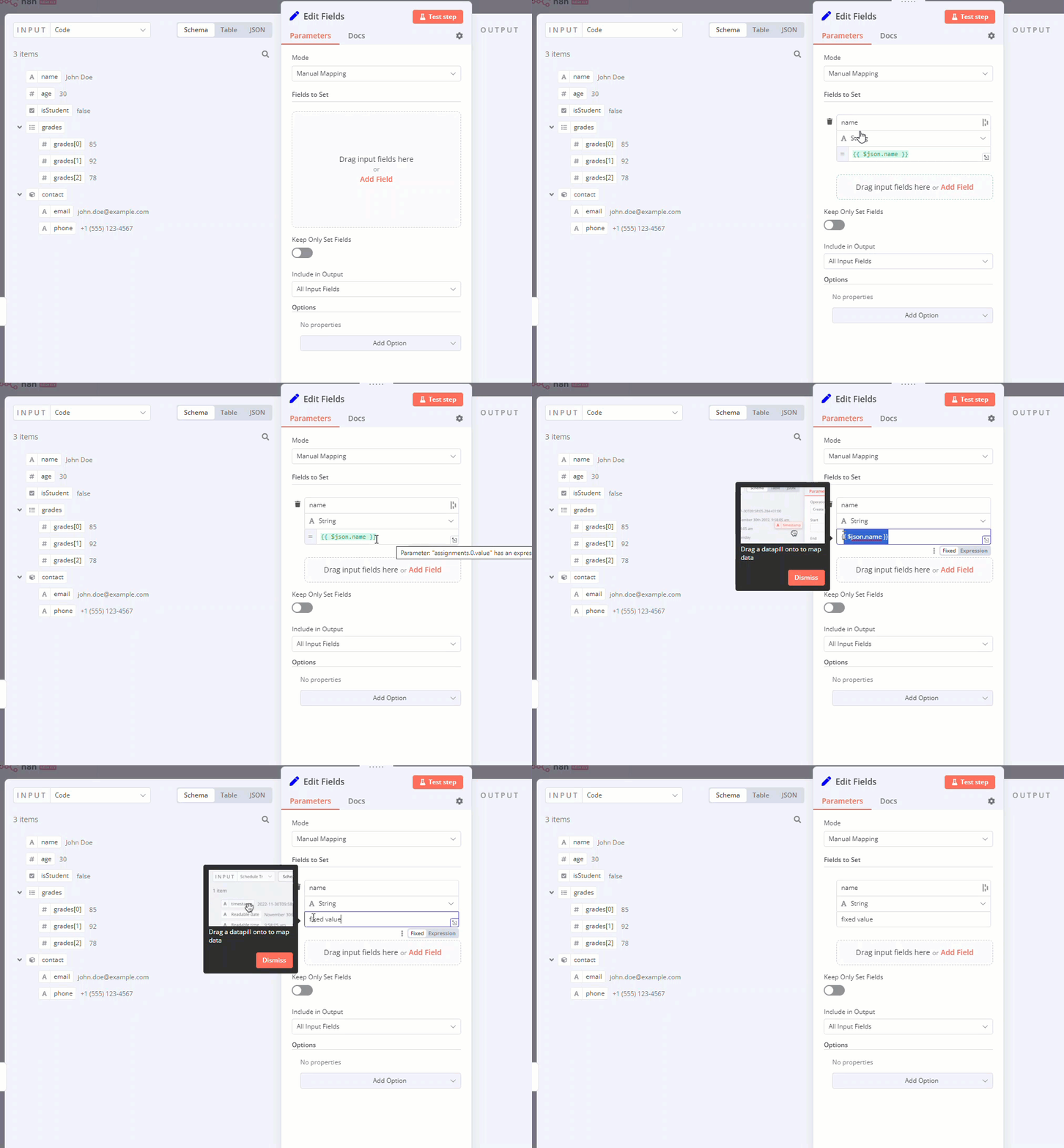
หากคุณเลือก Mode > Manual Mapping คุณสามารถกำหนดค่าฟิลด์ได้โดยการลากและวางค่าจาก INPUT.
ลักษณะการทำงานเริ่มต้นเมื่อคุณลากค่าคือ:
- n8n ตั้งชื่อค่าเป็นชื่อฟิลด์
- ค่าของฟิลด์ประกอบด้วย expression ที่เข้าถึงค่า
หากคุณไม่ต้องการใช้ expression:
- โฮเวอร์เหนือฟิลด์ n8n แสดงไฟล์ แก้ไข | expression (Fixed | Expressions) สลับ
- เลือก Fixed.
คุณสามารถทำได้ทั้งกับชื่อและค่าของฟิลด์
Keep Only Set Fields
เปิดใช้งานสิ่งนี้เพื่อละทิ้งข้อมูล input ที่คุณไม่ได้ใช้ Fields to Set.
Include in Output
เลือกข้อมูล input ที่จะรวมไว้ในข้อมูล output ของ node
ตัวเลือก node
ใช้ตัวเลือกเหล่านี้เพื่อปรับแต่งลักษณะการทำงานของ node
Include Binary Data
หากข้อมูลที่ป้อนมีข้อมูลไบนารี ให้เลือกว่าจะรวมไว้ในข้อมูล output ของ node แก้ไขฟิลด์หรือไม่
Ignore Type Conversion Errors
การทำแผนที่ด้วยตนเองเท่านั้น
การเปิดใช้งานนี้ทำให้ n8n สามารถละเว้นข้อผิดพลาดประเภทข้อมูลบางอย่างเมื่อทำการแมปฟิลด์
Support Dot Notation
ตามค่าเริ่มต้น n8n รองรับสัญลักษณ์จุด
ตัวอย่างเช่น เมื่อใช้การแมปด้วยตนเอง node จะเป็นไปตามสัญลักษณ์จุดสำหรับ Name สนาม นั่นหมายความว่าถ้าคุณตั้งชื่อใน Name สนามเป็น number.one และคุณค่าใน Value สนามเป็น 20 JSON ผลลัพธ์คือ:
{ "number": { "one": 20} }
คุณสามารถป้องกันพฤติกรรมนี้ได้โดยการเลือก Add Option > Support Dot Notation และการตั้งค่า Dot Notion สนามที่จะปิด ตอนนี้ JSON ผลลัพธ์คือ:
{ "number.one": 20 }
เทมเพลตและตัวอย่าง
เรียกดูเทมเพลตการรวมแก้ไขฟิลด์ (ชุด) หรือ ค้นหาเทมเพลตทั้งหมด
array และ expression ในโหมด output JSON
คุณสามารถใช้ array และ expression เมื่อสร้าง output JSON ของคุณได้
ตัวอย่างเช่น เมื่อได้รับข้อมูล input นี้ที่สร้างโดย node Customer Datastore:
[
  {
    "id": "23423532",
    "name": "Jay Gatsby",
    "email": "gatsby@west-egg.com",
    "notes": "Keeps asking about a green light??",
    "country": "US",
    "created": "1925-04-10"
  },
  {
    "id": "23423533",
    "name": "José Arcadio Buendía",
    "email": "jab@macondo.co",
    "notes": "Lots of people named after him. Very confusing",
    "country": "CO",
    "created": "1967-05-05"
  },
  {
    "id": "23423534",
    "name": "Max Sendak",
    "email": "info@in-and-out-of-weeks.org",
    "notes": "Keeps rolling his terrible eyes",
    "country": "US",
    "created": "1963-04-09"
  },
  {
    "id": "23423535",
    "name": "Zaphod Beeblebrox",
    "email": "captain@heartofgold.com",
    "notes": "Felt like I was talking to more than one person",
    "country": null,
    "created": "1979-10-12"
  },
  {
    "id": "23423536",
    "name": "Edmund Pevensie",
    "email": "edmund@narnia.gov",
    "notes": "Passionate sailor",
    "country": "UK",
    "created": "1950-10-16"
  }
]
เพิ่ม JSON ต่อไปนี้ใน JSON Output สนามด้วย Include in Output ตั้งค่าเป็น All Input Fields:
{
  "newKey": "new value",
  "array": [{{ $json.id }},"{{ $json.name }}"],
  "object": {
    "innerKey1": "new value",
    "innerKey2": "{{ $json.id }}",
    "innerKey3": "{{ $json.name }}",
 }
}
คุณได้รับผลลัพธ์นี้:
[
  {
    "id": "23423532",
    "name": "Jay Gatsby",
    "email": "gatsby@west-egg.com",
    "notes": "Keeps asking about a green light??",
    "country": "US",
    "created": "1925-04-10",
    "newKey": "new value",
    "array": [
      23423532,
      "Jay Gatsby"
    ],
    "object": {
      "innerKey1": "new value",
      "innerKey2": "23423532",
      "innerKey3": "Jay Gatsby"
    }
  },
  {
    "id": "23423533",
    "name": "José Arcadio Buendía",
    "email": "jab@macondo.co",
    "notes": "Lots of people named after him. Very confusing",
    "country": "CO",
    "created": "1967-05-05",
    "newKey": "new value",
    "array": [
      23423533,
      "José Arcadio Buendía"
    ],
    "object": {
      "innerKey1": "new value",
      "innerKey2": "23423533",
      "innerKey3": "José Arcadio Buendía"
    }
  },
  {
    "id": "23423534",
    "name": "Max Sendak",
    "email": "info@in-and-out-of-weeks.org",
    "notes": "Keeps rolling his terrible eyes",
    "country": "US",
    "created": "1963-04-09",
    "newKey": "new value",
    "array": [
      23423534,
      "Max Sendak"
    ],
    "object": {
      "innerKey1": "new value",
      "innerKey2": "23423534",
      "innerKey3": "Max Sendak"
    }
  },
  {
    "id": "23423535",
    "name": "Zaphod Beeblebrox",
    "email": "captain@heartofgold.com",
    "notes": "Felt like I was talking to more than one person",
    "country": null,
    "created": "1979-10-12",
    "newKey": "new value",
    "array": [
      23423535,
      "Zaphod Beeblebrox"
    ],
    "object": {
      "innerKey1": "new value",
      "innerKey2": "23423535",
      "innerKey3": "Zaphod Beeblebrox"
    }
  },
  {
    "id": "23423536",
    "name": "Edmund Pevensie",
    "email": "edmund@narnia.gov",
    "notes": "Passionate sailor",
    "country": "UK",
    "created": "1950-10-16",
    "newKey": "new value",
    "array": [
      23423536,
      "Edmund Pevensie"
    ],
    "object": {
      "innerKey1": "new value",
      "innerKey2": "23423536",
      "innerKey3": "Edmund Pevensie"
    }
  }
]
