
Keep up to three fields pinned in place while scrolling horizontally in Grid view.
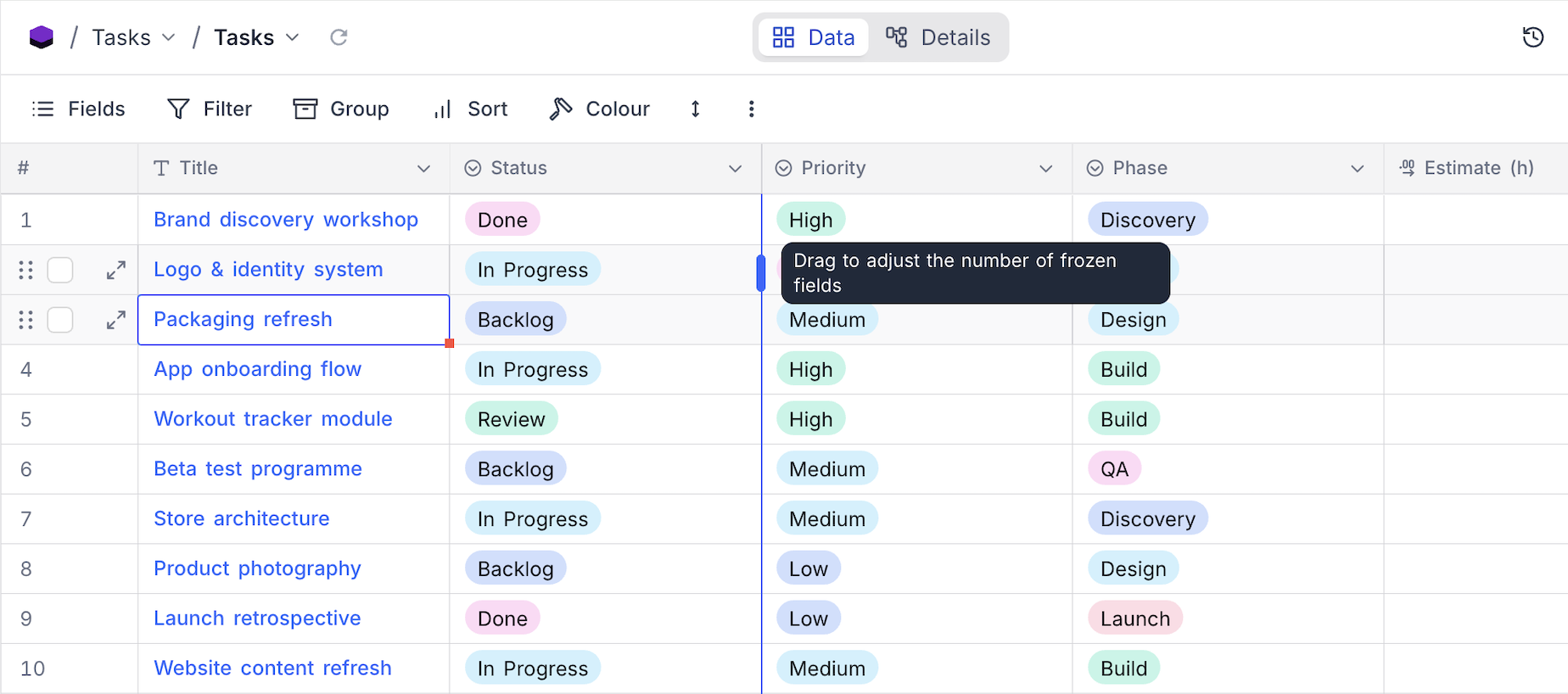
Freezing keeps the leftmost fields of a grid pinned in place while you scroll horizontally, so identifying fields such as a name or ID stay visible next to whatever you are looking at. A grid can freeze up to three fields , counting the display value, and the frozen region is marked by a boundary line.
Adjust frozen fields
- Hover over the boundary line at the right edge of the frozen region. The handle shows Drag to adjust the number of frozen fields .
- Drag the divider left or right. It snaps to field edges and shows how many fields will be frozen as you drag.
- Release to apply. The setting is saved per view.
Notes
- The frozen region can take up at most three quarters of the window width. If the window is too narrow to show every frozen field, NocoDB temporarily freezes fewer fields and explains why, with an option to reset to one frozen field. Enlarging the window or narrowing the fields restores the saved setting.
- Frozen fields are also supported on interface pages that use the Grid visualization.
Related pages
- Hide & Reorder Fields : Learn how to hide and reorder fields in NocoDB.
- Filtering Records : Learn how to filter records in NocoDB.
- Sorting Records : Learn how to sort records in NocoDB.
- Grouping Records : Learn how to group records in NocoDB.
- Colouring Records : Learn how to colour records and individual fields in NocoDB.
- Record Height : Learn how to adjust the height of records in NocoDB.
- Search : Learn how to search for records in NocoDB.
- Realtime Presence : See who else is working in a table, live, with per-collaborator markers in the grid.
